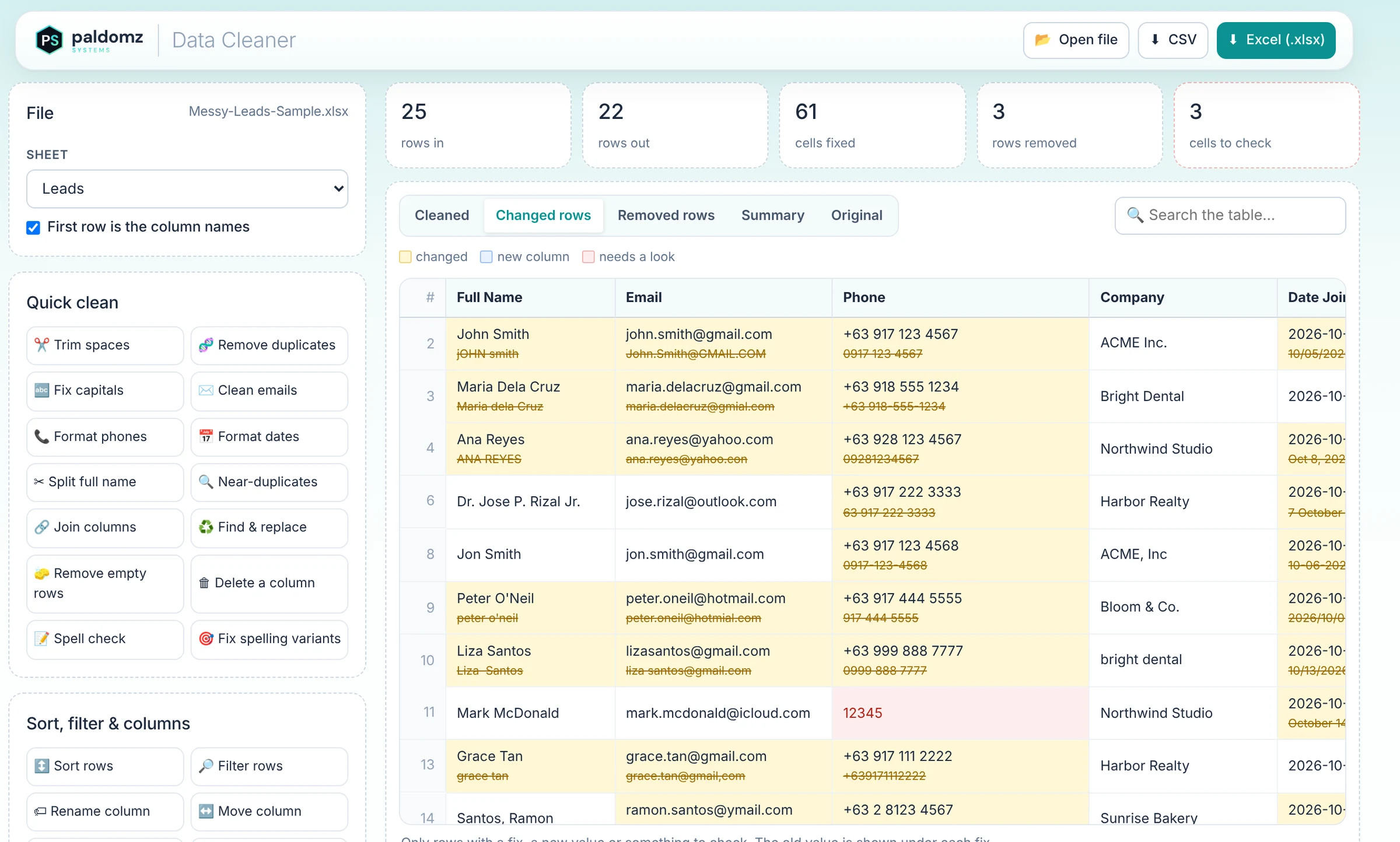
Everything a messy list needs
Pick a fix, check the preview, save. Steps stack up, so the same clean-up runs again on next week's file.
Duplicates & near-duplicates
Remove exact repeats by any columns, and find “Acme Inc” vs “ACME, Inc.” look-alikes for you to decide.
Capitals & spaces
“jOHN smith ” becomes “John Smith” — with Mc, O', Dela, de los and Jr. handled properly.
Emails
Fixes gmial, yahoo.con and stray spaces, lowercases them, and flags emails that can't be right.
Phone numbers
0917-123-4567, (0917) 123 4567 and 63917… all become one format. Philippines, US, UK, Australia and more.
Dates
“Oct 8, 2026”, 10/05/2026 and “7 October” all turned into the date format you choose.
Spell check
Finds typos in any column with suggestions, and unifies spelling variants like “Quezon Cty” → “Quezon City”.
Sort & filter
Sort by any column, keep or drop rows by text, numbers, blanks or bad values.
Columns
Split full names, join or split columns, rename, move, fill blanks, extract parts and add prefixes.
Undo & recipes
Undo, redo or start over any time. Save your steps as a recipe and reuse them on the next file.
Excel can do it. This does it in minutes.
Everything here is possible with Excel formulas — if you know them, and have an afternoon.
In Excel
- ✕ Formulas like PROPER, TRIM and SUBSTITUTE in helper columns
- ✕ Phone and date formats fixed one pattern at a time
- ✕ Remove Duplicates deletes rows without showing which
- ✕ Repeat everything by hand for next week's file
In Data Cleaner
- ✓ One click per fix, no formulas
- ✓ Every format handled at once
- ✓ Every change shown, with the old value underneath
- ✓ Save the steps once and rerun them in a second
From messy to clean in three steps
Open your file
Drop in an .xlsx, .xls or .csv. It's read on your device and never uploaded.
Click the fixes
Choose the clean-ups you need and check the highlighted changes.
Download
Save the clean list as Excel or CSV, ready to import or send.
Pay once. Clean lists forever.
Already purchased? Open the app & paste your key →
Questions
Is my data uploaded anywhere?
No. Your file is opened and cleaned inside your browser on your own device. Nothing is sent to a server — it even works with your WiFi off.
Which files does it open?
Excel (.xlsx and .xls) and CSV files, including workbooks with several sheets. You download the result as .xlsx or .csv.
Will it change my original file?
Never. Your original stays as it was; you download a new clean copy. You can also see the original inside the app at any time.
How big a list can it handle?
Everyday lists of a few thousand rows clean in seconds on a normal laptop or phone. Very large files depend on your device's memory, so a laptop is best for those.
Which devices does it work on?
Any modern browser on Windows, macOS, Android or iOS. You can install it like an app. One license covers up to 5 of your own devices.
What's your refund policy?
Because this is instant-access digital software, all sales are final. If anything doesn't work, email info@paldomzsystems.com first — I'm a small maker and I'll make it right.
Stop fixing lists by hand
Clean, check and download — from one private app you own.
★ Get Data Cleaner — $14.99